
Help and Support Center
Bank Reconciliation Opening Balance Incorrect
This document describes what to do when you see this message when starting the Bank Rec process.
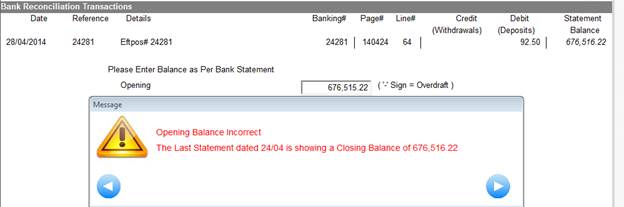
What this is saying is the Opening Balance you have entered is not the same as the Closing Balance of the last Bank Statement.
Common causes of this are
· Bank Statements processed out of order
· ‘Fictitious’ figures entered in the screen below.
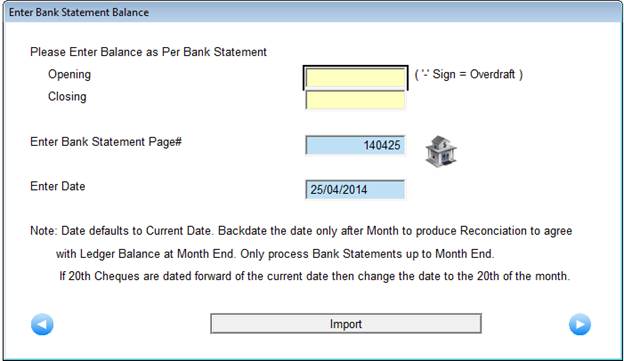
Please note the figures entered here must be the exact figures from the actual bank statement.
In order to fix you firstly need to find the last time the actual bank statement balanced with Magix.
Admin-Cash Book-Bank Reconciliation-Bank Statement Inquiry will show the following screen (once you select the current month).
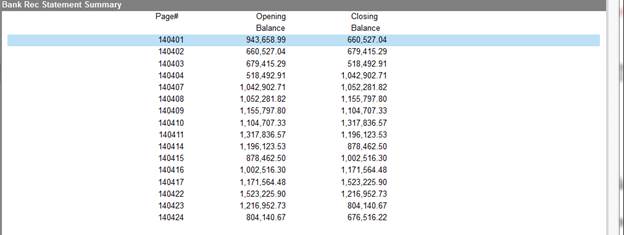
Starting from the most recent, compare the Opening and Closing Balances with the Actual Bank Statement until you find where it last matched/balanced. Note the Page# (and thus the date).
Go to Admin-Cash Book-Bank Reconciliation-Reset Bank Reconciliation and Enter this date.
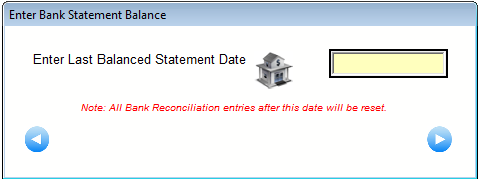
Start the Bank Reconciliation process again making sure they are processed in order from this date and ensuring the Closing Balance of each Bank Statement matches.